
Non-terminal messages during a test
During a test run, you may see informational messages that are non-terminal. They don’t stop the test from continuing and delivering a pass/fail result. They are still worth understanding, because they can sometimes lead to a failure.
Model switch during a test
When a test runs on Anthropic’s Opus 5.5 or later, the model may occasionally decline a step because it triggers Anthropic’s safety classifiers. This most often happens when secrets (such as credentials) are used within a test.
If a step is declined, ATP360 automatically falls back to Sonnet 5 to complete the portion of the test that triggered the refusal. The switch appears in the Action Log as a Reasoning message:
-png.png?width=561&height=297&name=image%20(4)-png.png)
Session restarts
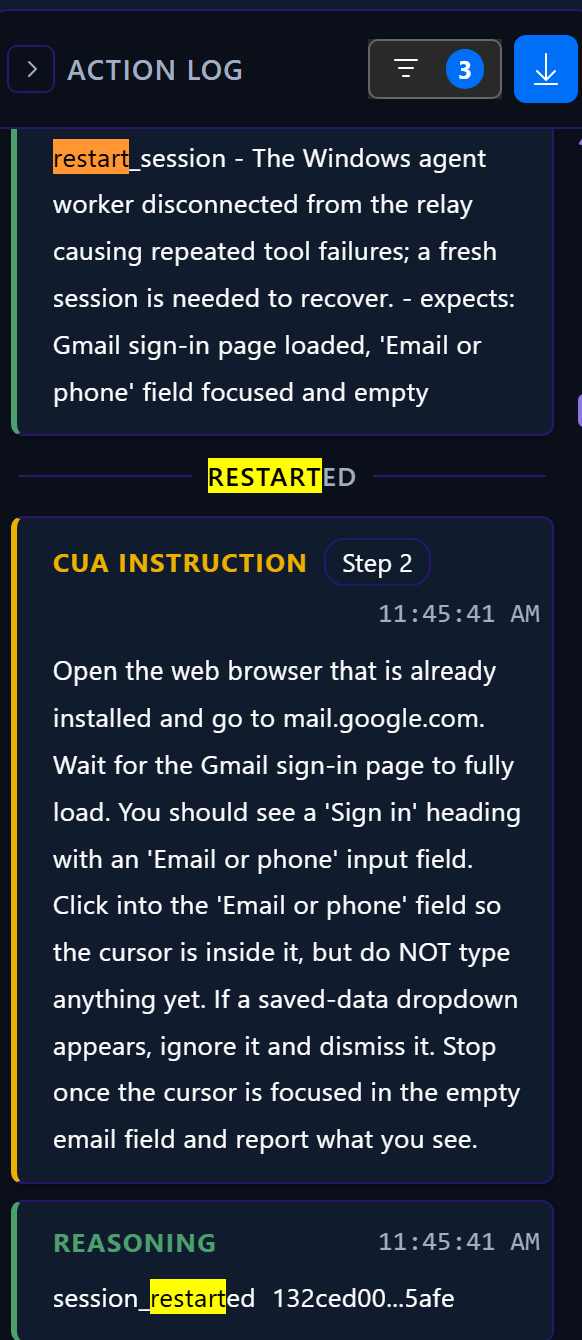
If a test is interrupted, for example by a networking issue or a disconnected agent worker, ATP360 attempts to recover before failing the test by restarting the CUA worker session.
A restart appears in the Action Log as a restart_session entry, followed by a RESTARTED divider and a Reasoning message confirming the new session ID. The CUA then resumes with a fresh instruction:
Test Failures
When a test run does not complete successfully, ATP360 records a failure reason. These reasons help distinguish between failures in the application or workflow being tested, AI execution issues, platform issues, and administrative actions. ATP360 also includes configurable controls for cost, token usage, actions, retries, and session restarts, which can influence how a run is classified.
Expected Failure
What it means
A genuine test failure. A required test step could not be completed, a pass criterion was not met, or a defined failure criterion was triggered.
This indicates ATP360 successfully executed the test and determined that the expected outcome was not achieved.
Common examples
- A login attempt fails with valid test credentials
- A required page does not load
- Expected data is not displayed
- A validation check fails
- A workflow produces an incorrect result
What to do
Review the run details and evidence to identify the failed step or criterion, then correct the application, environment, test data, or test design as appropriate.
AI Could Not Complete
What it means
The AI agent was unable to complete the workflow, even after attempting recovery actions and retries where permitted.
Unlike Expected Failure, this does not necessarily indicate that the application under test failed. Instead, it means the AI could not successfully navigate or complete the scenario.
Common examples
- The AI cannot identify a required user interface element
- Navigation becomes ambiguous
- An unexpected dialog or prompt blocks progress
- The application enters a state from which the AI cannot recover
What to do
Review the run evidence to identify where progress stopped. Consider refining the test case, improving application stability, or simplifying the workflow being exercised.
Step Limit Reached
What it means
The test reached a configured execution limit and ATP360 stopped the run automatically.
ATP360 includes configurable safeguards to prevent runaway automation, excessive costs, and tests becoming stuck indefinitely. When one of these limits is reached, the run is classified as Step Limit Reached. Execution limits are configured in Limits & Controls.
Sub-types
Max Steps (maxSteps)
The test step exceeded the configured Max actions per test step limit.
This setting controls the maximum number of individual actions the CUA agent may perform while attempting to complete a single step, including clicks, typing, screen reads, and screenshots. If a step requires more actions than permitted, ATP360 stops attempting that step and fails the run.
Common examples
- The AI becomes stuck in a loop
- A required UI element cannot be found
- An application repeatedly redirects the user
- A single test step is significantly more complex than expected
What to do
Review the run evidence to determine why the step required so many actions. Either simplify the workflow or increase the Max actions per test step limit if the step is legitimately complex.
Max Turns (maxTotalTurns)
The test exceeded the configured Max no of turns per test run limit.
A turn represents a complete prompt/response cycle between ATP360 and the CUA agent. This setting acts as a hard ceiling on the total amount of AI reasoning permitted during a single test run.
Common examples
- Long-running workflows
- Excessive reasoning cycles
- Repeated navigation attempts
- Large end-to-end test scenarios
What to do
Review the run history to determine why the AI required so many turns. Consider simplifying the test case or increasing the Max no of turns per test run limit.
Reprompt Limit Reached (maxRepromptsPerTask)
The test exceeded the configured Max reprompts per task limit.
If the CUA agent cannot determine the correct set of actions required to complete a test step, ATP360 may reprompt the AI and allow it to try again. This limit determines how many retry attempts are allowed before the test is failed.
Common examples
- Ambiguous application states
- Unclear or dynamically changing user interfaces
- UI elements appearing in unexpected locations
- Steps that repeatedly confuse the AI
What to do
Review the failing step and determine why repeated recovery attempts were unsuccessful. Consider updating the application, refining the test case, or increasing the Max reprompts per task setting.
Session Restart Limit Reached (maxSessionRestarts)
The test exceeded the configured Max Session Restarts limit.
Session restarts are designed to help ATP360 recover from failures unrelated to the test case itself, such as temporary infrastructure or connectivity issues. ATP360 will restart the run and attempt to continue until the configured restart allowance is exhausted.
Common examples
- Worker connectivity interruptions
- Temporary platform outages
- Browser crashes
- Environmental instability
- Transient infrastructure issues
What to do
Review the run history and platform logs to identify why session restarts were required. If transient failures are common in the test environment, consider increasing the Max Session Restarts limit.
Stopped Manually
What it means
A user manually stopped the test while it was running.
ATP360 includes human oversight controls that allow test execution to be halted when required.
Common examples
- The wrong test was started
- A tester identifies an issue and intervenes
- Maintenance is required on the test environment
- The run is no longer needed
What to do
No investigation is normally required unless the run was stopped unintentionally. The test can be restarted when appropriate.
Platform Error
What it means
The failure was caused by ATP360, test infrastructure, worker connectivity, or an external AI provider rather than the application being tested.
ATP360 relies on multiple services including AI providers, orchestration services, workers, storage, databases, and platform infrastructure.
Common examples
- Worker connectivity loss
- Service outage
- AI provider timeout
- Infrastructure failure
- Internal processing error
What to do
Review the ATP360 System Error Log and platform status information. If the issue persists, contact ATP360 support with the run identifier and any associated error information. Examples of platform-level errors documented by ATP360 include parser timeouts, worker connection loss, invalid AI responses, and AI provider authentication failures.
Budget Exceeded
What it means
ATP360 stopped the run because a configured spending limit or workspace trial budget cap was reached.
ATP360 allows administrators to define maximum execution budgets and automatically stops runs that exceed those limits.
Common examples
- A workspace trial budget has been exhausted
- A run consumes more AI processing than expected
- Repeated retries increase execution costs beyond the configured threshold
What to do
Review the workspace budget settings and execution limits. Additional runs may require increasing the configured budget or waiting for trial budget restrictions to reset or be removed.
Other
What it means
ATP360 could not determine a more specific failure classification, or the failure reason is not recognised by the current platform version.
Common examples
- An unexpected error path occurs
- Diagnostic information is incomplete
- A new failure type has not yet been categorised
- Historical run data contains an unknown reason code
What to do
Review the run details and any available logs. If the cause is unclear, contact ATP360 support with the run identifier for further investigation.
Quick Reference
| Failure Reason | Meaning | Recommended Action |
|---|---|---|
| Expected Failure | A genuine test failure. A required test step could not be completed, a pass criterion was not met, or a failure criterion was triggered. | Review the failed step or criterion and correct the application, environment, test data, or test design. |
| AI Could Not Complete | The AI agent could not successfully complete the workflow. | Review the run evidence and investigate where the AI became blocked. |
| Step Limit Reached | A configured execution safeguard was exceeded. | Review the sub-type and adjust limits or investigate why the run became stuck. |
| Stopped Manually | A user stopped the run. | Restart the test if required. |
| Platform Error | ATP360, infrastructure, worker, or AI provider issue. | Review system logs and contact support if the problem persists. |
| Budget Exceeded | The configured budget limit was reached. | Review workspace budget and execution settings. |
| Other | An unclassified or unknown failure reason. | Review logs and investigate further. |
Step Limit Reached Reference
| Sub-Type | Internal Code | Limit Setting | Meaning |
|---|---|---|---|
| Max Steps | maxSteps |
Max actions per test step | A single test step required more actions than allowed. |
| Max Turns | maxTotalTurns |
Max no of turns per test run | The run exceeded the maximum number of AI prompt/response cycles. |
| Reprompt Limit Reached | maxRepromptsPerTask |
Max reprompts per task | The AI exhausted its allowed recovery attempts for a step. |
| Session Restart Limit Reached | maxSessionRestarts |
Max Session Restarts | The run required more restart attempts than allowed. |