
The Gateway is essential to communications between the Web Host UI and the Task Runners carrying out import/export and testing activities in Change360. Gateway resilience ensures that sequences successfully complete even when:
- The Gateway loses connectivity with the Web Host
- Task runners loos connectivity with the Gateway
Connectivity between the Gateway and the Web Host and Task Runners can be lost for a number of reasons, such as:
- Web Host restarts during new releases
- Gateway upgrade in progress
- Gateway VM powered off
- Gateway unexpectedly restarted
- Gateway Agent offline
Gateway resilience ensures that in these above scenarios sequences will continue and complete successfully once connectivity is restored.
Listed below are different resilience scenarios and how these are logged in the sequence console.
Web Host restarts during new releases
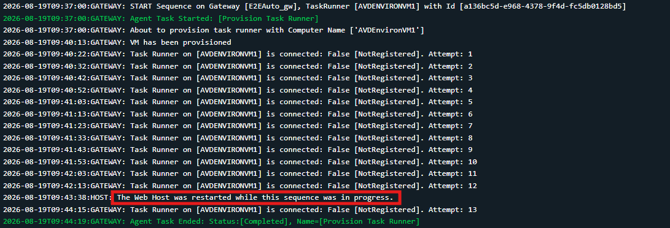
The Change360 release schedule is managed to avoid times when sequences are typically running, however sometimes, such as urgent hotfixes, a release may need to happen while sequences are in progress. When this happens you will see a message in the sequence console stating that "The Web Host was restarted while this sequence was in progress." and you should see the sequence continuing to execute after the message.
Gateway upgrade in progress
When a new release is deployed the Gateway will automatically update once any in progress sequences have completed. Any sequences that are started while the Gateway is updating will be queued until the update is complete and the Gateway is back online.

Gateway VM powered off/Gateway Agent offline
Any sequences started while the Gateway VM is powered off or the the Gateway Agent is offline will be queued on the Web Host and started when the Gateway is back online. A message in the sequence console will state that the sequence is queued as well as the queue position.

Gateway unexpectedly restarted
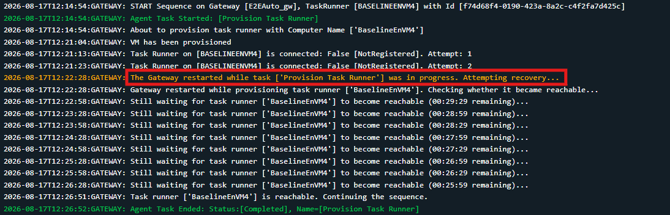
If the Gateway restarts unexpectedly while a sequence is running the following message will be displayed, "The Gateway restarted while task ['Task name'] was in progress. Attempting recovery...".
-
Gateway restarted during provisioning
If the current action is running from the Gateway, even provisioning, the Gateway will attempt to determine that the step completed successfully:
- Gateway restarted during task execution
If the current action is running on the Task Runner the console will indicate that subsequent steps in the task where completed after connectivity tot he Gateway was restored:
