
Testing an application on Cloud PC Task Runners
To test applications on a Cloud PC Task Runner do the following:
- On the right-hand navigation bar browse to Modern Readiness under Dashboards
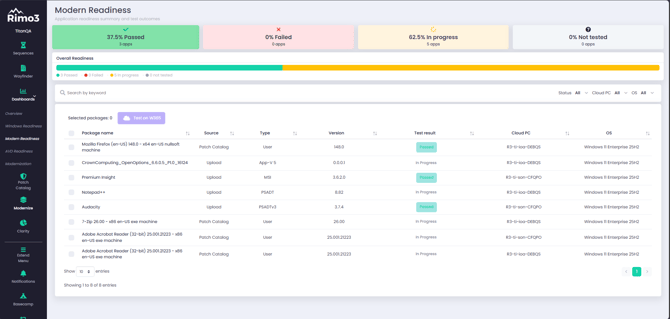
- Select one or more applications from the list of onboarded applications
Any application that has been successfully Discovered, and has one or more shortcuts will appear on the Modern Readiness dashboard.
- Click on Test on W365
- Select one or more Cloud PCs
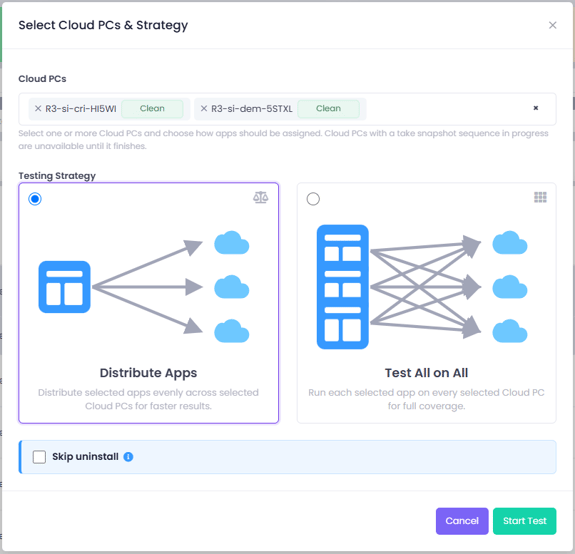
- When selecting multiple Cloud PCs you will be given the the following testing strategy options:
- Distribute Apps - The selected apps will be load balanced across the selected Cloud PC for quicker results, e.g. if you select 10 apps and 2 Cloud PCs then 10 tests will be carried out, 5 on each Cloud PC. Use this option when the selected Cloud PCs are of the same build.
- Test All on All - The selected apps will all be tested on each of the selected Cloud PCs, e.g. if you select 10 apps and 2 Cloud PCs then 20 tests will be performed, 10 on each Cloud PC. Use this option when the selected Cloud PCs are of different builds for full coverage
- Skip uninstall - when selected the uninstall step is skipped. On Clean Cloud PCs this has no impact as they are reverted to a clean state before the next test, but on Persistent Cloud PCs the application will remain installed for future tests. This allows, for example, upgrade scenarios to be tested by retesting the newer versions of the same applications on the same Cloud PC(s)
When you selected both Clean and Persistent Cloud PCs, restore Snapshot will be skipped for Persistent Cloud PCs. When using the Distribute Apps strategy, applications are assigned automatically across the selected Cloud PCs, so it is not possible to control which applications run on Clean versus Persistent Cloud PCs.
- Once you have selected the target Cloud PCs and a testing strategy, if applicable, click on Start Test. This will start Smoke Test sequences for the selected application(s) and report the results on the Modern Readiness dashboard when they are complete.
If a selected Cloud PC Task Runner doesn’t have a useable snapshot a sequence will not be started on that device.