
When Change360 provisions a Cloud PC for you a number of things happen behind the scenes after you click on Confirm & provision, especially when you provision the first Cloud PC.
- An Azure Network Connection is created (first time only)
- Dynamic security group called Rimo3-CloudPCs created (first time only) with a membership rule for all Cloud PCs provisioned through Change360
- A Platform script is added to Intune (first time only) and assigned to the dynamic security group
- A Provisioning policy is created (if required)
- A Security group is created (if required) and assigned to the provisioning policy
- A User Setting policy called Rimo3-CloudPC-LocalAdmins is created and assigned to the Security group
- A Cloud PC User is created (if required) and added to the Security group
The "Rimo3" group and policy names are still used for compatibiity with existing deployments and will be migrated to a "WorkspaceDNA" naming convention in a future update.
Azure network connection
When creating the first provisioning policy via the Cloud PC Task Runner feature, we also need to create a bridge between the Cloud PC and the Rimo3 Gateway’s virtual network. This can take up to 30mins for Azure to do but only needs to happen once before the first Cloud PC is provisioned. Subsequently added Cloud PCs will start provisioning immediately.
If the Windows 365 Network User and Windows 365 Network Interface Contributor roles have not been granted to the Windows 365 service principal—on both the virtual network to which the Rimo3 Gateway is attached and the resource group that contains that virtual network—this action will fail.
You can check the status of the Azure network connection in Intune, https://intune.microsoft.com/#view/Microsoft_Intune_DeviceSettings/DevicesMenu/~/Cloud%20PC.
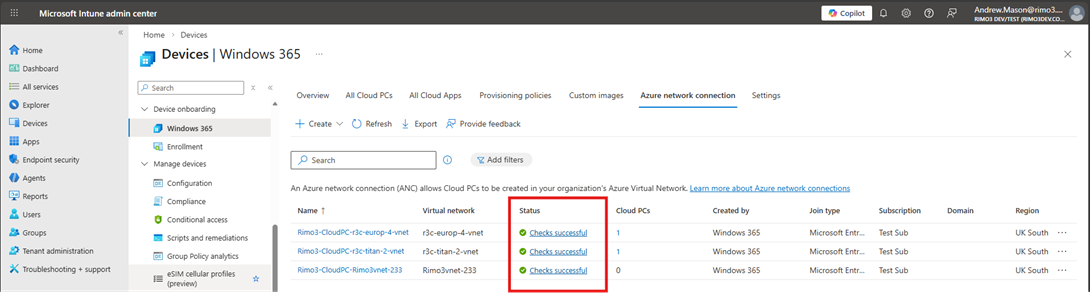
You can click into the status of the Azure network connection for more details, if the First party app permissions exist on Azure resource group and First party app permissions exist on Azure virtual network checks have passed then the Azure network connection roles detailed above have been correctly applied.
Dynamic security group
A dynamic security group, with the name Rimo3-CloudPCs, is created the first time a Cloud PC is provisioned for you by Change360. This group will be used to run a Provisioning script on new Cloud PCs to install and register the Change360 Task Runner agent.
The membership rule for the dynamic security group matches the display name prefix of Cloud PCs provisioned by Change360, "r3-"
The "Rimo3" group names and "r3-" prefix are still used for compatibiity with existing deployments and will be migrated to a "WorkspaceDNA" naming convention in a future update.
Platform script
A Platform script, called Rimo3 Cloud PC Task Runner Platform Script, is created the first time Change360 provisions a Cloud PC for you. The Platform script is used to install and register the Change360 Task Runner agent on Cloud PCs provisioned by Change360.
The Platform script is assigned to the Rimo3-CloudPCs dynamic security group.
The "Rimo3" script names is still used for compatibiity with existing deployments and will be migrated to a "WorkspaceDNA" naming convention in a future update.
Provisioning policy
If necessary a new Provisioning policy is created as configured in the Provision new Cloud PC wizard.
Security group
If necessary a new Security group is created as configured in the Provision new Cloud PC wizard and assigned to the Provisioning policy selected/created in the Provision new Cloud PC wizard.
User setting
if necessary a User setting policy is created to grant local admin rights to the new Cloud PC and assigned to the Security group selected/created in the Provision new Cloud PC wizard.
Local admin rights are only used when applications are installed. When testing applications, they are launched in the non-elevated context.
Cloud PC User
If necessary a new user is created as configured in the Provision Cloud PC wizard and assigned to the Security group selected/created in the Provision new Cloud PC wizard.