
This page explains how ATP360 lets tests sign in to applications without exposing credentials to an AI engine, and how to manage those credentials on the Stored Secrets tab. It is for administrators and test authors who work with credentials.
Some tests have to sign in to something. ATP360 handles that without ever showing the credential to an AI engine.
How secrets work in a test
In a test case, a secret appears as a pill inside the step text — for example “Log in to Accounts Receivable with [Accounts Receivable jmoore] and [Accounts Receivable jmoore pw]”. At run time, AI is used only to locate and focus the right text box; ATP360 then hands over to deterministic automation, which inserts the selected secret from an Azure Key Vault. The AI never sees the value — which is what makes this defensible from an AI governance point of view.
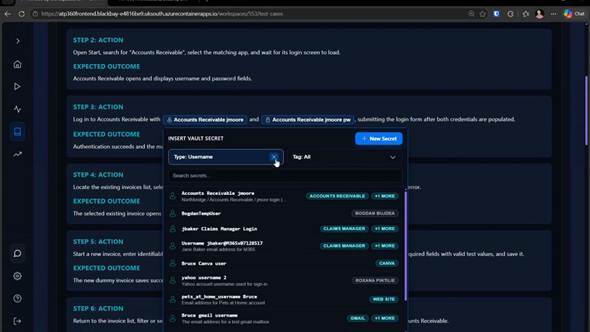
Figure 1 — Choosing a stored secret for a step. You can see its name, description and tags; the value itself is never shown.
Click a secret pill to change which secret a step uses. The picker can be filtered by type and by tag, searched, and used to create a new secret on the spot.
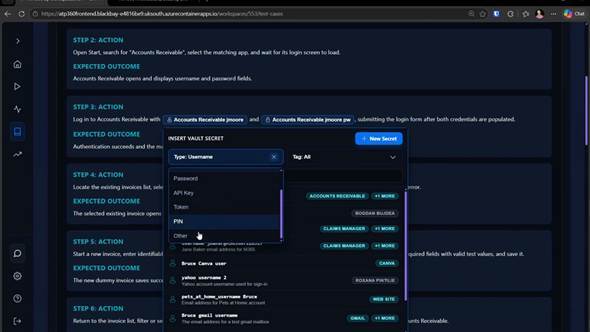
Figure 2 — Secrets are typed — username, password, API key, token, PIN or other — and the picker can be filtered by type and tag.
The Stored Secrets tab
Settings > Stored Secrets lists every credential held for the workspace, with + Add New Secret to create one. Values are write-only: you can overtype a secret with a new value — and see what you have just typed — but you can never read back a stored one, whether from the picker or from here.
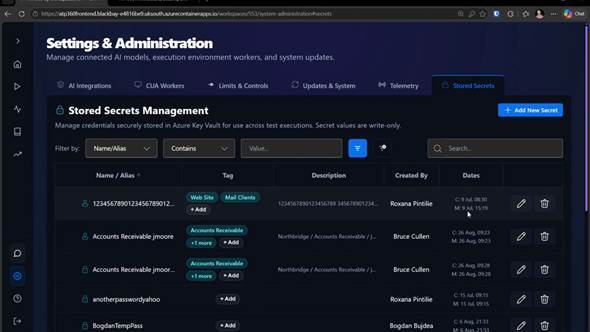
Figure 3 — Settings > Stored Secrets: names, tags, descriptions, who created each secret and when it was created and modified.
| Column | What it tells you |
|---|---|
| Name / Alias | The name used to refer to the secret in test steps. |
| Tag | Tags grouping secrets by application or purpose. |
| Description | What the secret is for. |
| Created By | Who added it. |
| Dates | When it was created and last modified. |
Related articlesNote: Auditability — because the tab records who created each secret, when it was modified and what it is used by, you can account for every credential ATP360 holds without ever exposing one.
- Administration Guide – Overview
- Telemetry — what is and is never sent to WorkspaceDNA
- ATP360 Glossary — secret, test case, step