
This page explains what ATP360 reports to WorkspaceDNA about completed test runs, what each telemetry level sends and what is never sent, and how to change the level. It is for administrators and anyone responsible for data governance in the workspace.
ATP360 reports facts about completed test runs to WorkspaceDNA. We use those facts to compare AI engines on efficacy, cost and override rate, and to act on what we find — retiring models that underperform, tuning the ones that do well, and cutting the cost of a run.
You choose how much is reported. The setting lives on the Telemetry tab and takes effect immediately.
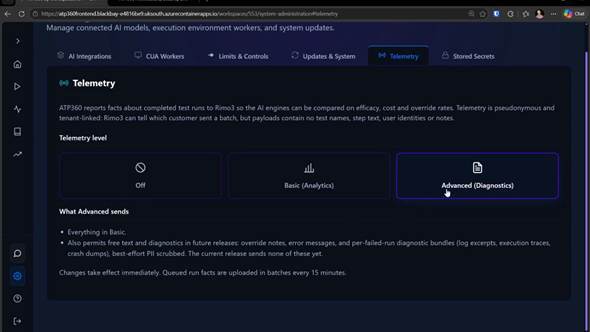
Figure 1 — Settings > Telemetry. Three levels, with what the selected level sends spelled out beneath the selector.
Telemetry levels
| Level | What it means |
|---|---|
| Off | Nothing is reported. No run facts leave your tenant. |
| Basic (analytics) | Structured run facts only — identifiers, outcomes, timings, token counts and costs. No free text of any kind. |
| Advanced (diagnostics) | Everything in Basic, plus limited free text — see What each level sends below. Advanced is the default for new workspaces. |
What each level sends
| Run fact | Off | Basic | Advanced |
|---|---|---|---|
| Run id, start and end time | No | Yes | Yes |
| Outcome and failure category | No | Yes | Yes |
| AI cost in USD | No | Yes | Yes |
| Generated steps vs executed actions | No | Yes | Yes |
| Worker Windows version | No | Yes | Yes |
| Workspace id | No | Yes | Yes |
| Per AI layer: provider, model, token counts and cost | No | Yes | Yes |
| Run review outcome and override reason code | No | Yes | Yes |
| Reviewer override note, PII scrubbed and shortened | No | No | Yes |
| Error messages and per-failed-run diagnostic bundles | No | No | Not yet |
| Test names, step text and user identities | No | No | No |
“Not yet” means the level permits it but the current release does not send it.
What is never sent
At every level, including Advanced, payloads carry no test names, no step text and no user identities. A run fact describes the shape of a run — how long it took, what it cost, whether it passed, which model produced the steps — not the application under test or the person who ran it.
Telemetry is pseudonymous and tenant-linked. WorkspaceDNA can tell which customer sent a batch, because that is what makes the comparison useful to you as well as to us, but a batch cannot be traced to an individual user from its contents.
Reviewer override notes (Advanced only)
When a reviewer overrides an AI verdict, ATP360 captures a reason code and, optionally, a free-text note. On Advanced, that note is sent — best-effort PII scrubbed and shortened first. Two things are worth knowing:
- Notes attached to reviews that agree with the AI are never sent. Only overrides are of interest, because those are the cases where the engine got it wrong.
- Scrubbing is best-effort, not a guarantee. If your reviewers routinely put customer names, hostnames or credentials in override notes, stay on Basic.
Diagnostics (not in the current release)
Diagnostic bundles are log excerpts, execution traces and crash dumps, best-effort PII scrubbed. Selecting Advanced today grants permission for them and for error messages, but the current release sends neither; when the capability ships, it will be documented before it starts sending.
How and when data is sent
Run facts are queued locally and uploaded in batches every 15 minutes. Only completed runs are reported; a run in progress is never in a batch.
Changing the level takes effect immediately and applies from that point forward. It does not retroactively delete facts already uploaded — to have previously uploaded telemetry removed, contact support.
Changing your telemetry level
- Open the Telemetry tab in Settings & Administration.
- Select Off, Basic (analytics) or Advanced (diagnostics).
- The panel below the selector updates to show what that level sends.
The change saves immediately. Anything already queued at the moment you lower the level is discarded rather than sent.
Common questions
Does telemetry slow down my runs?
No. Facts are written after a run completes and uploaded out of band.
Does Off affect any product functionality?
No feature depends on telemetry. You lose nothing in the product by turning it off; we lose the ability to tell you which engine is performing best for workloads like yours.
Can I see what has been sent?
Not in the current release.
Related articles
- Administration Guide – Overview
- Stored Secrets — how credentials are kept away from AI engines
- AI Integrations — the AI engines that telemetry compares
- ATP360 Glossary — override, test run, step