
This page describes the ATP360 Worker app window on a CUA worker and what it tells you. It is for administrators and test authors looking into a run that behaves oddly.
What the worker app shows
The worker app itself is a small window on the device. It shows the workspace it is paired with, the device name and agent version, its connection state and last heartbeat, whether a run is active (with the run ID and elapsed time), and a live activity log — screenshots captured, text typed, clicks and their coordinates. That log builds up as the worker is used, and is a useful first stop when a run behaves oddly.
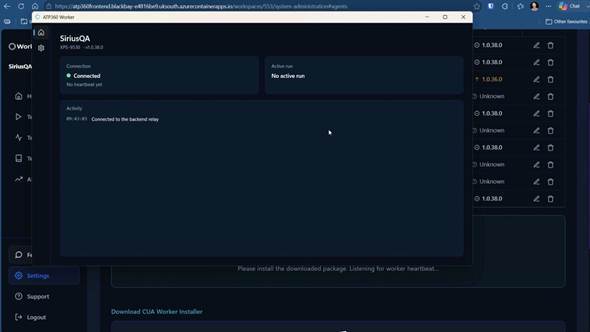
Figure 1 — The ATP360 Worker app on the device: connection state, agent version, active run and activity log.
For adding, updating and checking workers from Settings, see CUA Workers.
Related articles- CUA Workers
- Administration Guide – Overview
- ATP360 Glossary — CUA worker, test run, action