
This page covers the Limits & Controls tab in Settings: the six orchestrator controls that bound the cost, usage and reliability of every run. It is for administrators who want to keep running costs down without causing more failed tests.
About the orchestrator controls
These settings control how the orchestrator itself behaves. They exist to keep costs down and to keep efficiency and efficacy up, and the tab warns that changing them can increase running costs or cause more failed tests. Nothing here is irreversible.
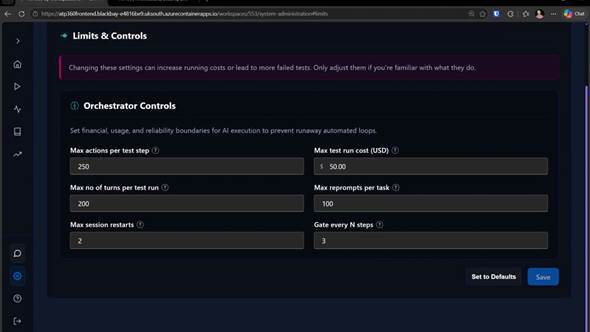
Figure 1 — Settings > Limits & Controls. Orchestrator Controls set the financial, usage and reliability boundaries for every run.
Hover the question mark beside any setting for an explanation of exactly what it does.
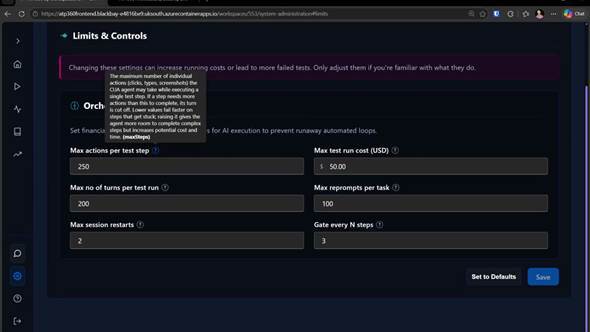
Figure 2 — Hovering a setting’s help icon explains what it controls.
| Setting | What it does | Guidance |
|---|---|---|
| Max test run cost (USD) | Caps the AI spend on a single run. | Probably the most important control here. It stops very large tests — and runaway tests where the AI is doing something unexpected — from consuming your budget. The default is $50. |
| Max actions per test step | Caps the individual actions (clicks, keystrokes, screenshots) the agent may take within one step. If a step needs more than this, its turn is cut off. | A step that needs a lot of actions is usually a step that was not specific enough. Keeping this tight makes such tests fail fast, which is better than letting the agent click around the UI and possibly pass by luck. |
| Max no of turns per test run | Caps the number of turns in a run. A turn is one full cycle between the orchestrator and the CUA worker — the orchestrator asking the worker to do something and getting the result back. | The same kind of lever as max actions per test step, applied to the whole run. A high number usually means a complicated test, but it also gives the agent room to wander. |
| Max reprompts per task | How many times the orchestrator may ask for the same thing again within a task when the worker cannot work out what to do. | Lower is generally better. If you are seeing large numbers here, the test steps are probably not specific enough — and a failure is a more useful signal than a re-prompted pass. |
| Max session restarts | How many times a run may restart after a failure unrelated to the test itself — a connectivity problem with the worker, for example. The run picks up where it left off. | A high count usually indicates an underlying problem. Note that pausing and resuming a test also increments it, so keep the number low. |
| Gate every N steps | How often a second, smaller model double-checks that the actions taken match the step that was asked for. | This is the guard against the agent heading off in a random direction. A lower number checks more often, which costs more but improves accuracy; a higher number is cheaper and less accurate. Three works well in practice — leave it there unless you are seeing accuracy problems. |
The settings in detailImportant: Remember to save — changes on this tab take effect when you click Save. Set to Defaults restores the shipped values.
Max test run cost (USD)
- What it does: caps the AI spend on a single run. It stops very large tests — and runaway tests where the AI is doing something unexpected — from consuming your budget. Probably the most important control on the tab.
- Default: $50.
- When to change it: raise it if you run particularly complex tests that would otherwise hit the cap and be stopped. Lower it if you are budget-constrained, or if you often see test cases stuck running in loops (which is unlikely).
Max actions per test step
- What it does: caps the individual actions (clicks, keystrokes, screenshots) the agent may take within one step. If a step needs more than this, its turn is cut off.
- Default: 250.
- When to change it: keep it tight. A step that needs a lot of actions is usually a step that was not specific enough, and a tight limit makes such tests fail fast rather than letting the agent click around the UI and possibly pass by luck.
Max no of turns per test run
- What it does: caps the number of turns in a run (see turn in the ATP360 Glossary). It is the same kind of lever as Max actions per test step, applied to the whole run.
- Default: 200.
- When to change it: a test that needs a high number is usually a complicated one, but a high limit also gives the agent room to wander. Raise it when the testing is more exploratory in nature, rather than structured, tightly defined test cases.
Max reprompts per task
- What it does: sets how many times the orchestrator may ask for the same thing again within a task when the worker cannot work out what to do.
- Default: 100.
- When to change it: lower is generally better. If you are seeing large numbers of reprompts, the test steps are probably not specific enough — and a failure is a more useful signal than a re-prompted pass.
Max session restarts
- What it does: sets how many times a run may restart after a failure unrelated to the test itself — a connectivity problem with the worker, for example. The run picks up where it left off.
- Default: 2.
- When to change it: keep the number low. A high count usually indicates an underlying problem, and pausing and resuming a test also increments it.
Gate every N steps
- What it does: sets how often a second, smaller model double-checks that the actions taken match the step that was asked for. It is the guard against the agent heading off in a random direction.
- Default: 3.
- When to change it: leave it at three unless you are seeing accuracy problems. A lower number checks more often, which costs more but improves accuracy; a higher number is cheaper and less accurate.
- Administration Guide – Overview
- AI Integrations — how the cost of a run is calculated
- CUA Workers — worker connectivity and session restarts
- ATP360 Glossary — action, turn, gate, step